
Screenshots


App details
- Updated
- Jan 12, 2024
- Category
- Mobile
SoftPas in:
This product is also available in the following languages:
About Total Uninstall
Download Total Uninstall – free uninstaller, remove programs, clean hard drive, junk file removal, system optimization
Overview
Designed for users seeking a reliable solution to manage software installations and removals, Total Uninstall is a utility application that focuses on maintaining system cleanliness and performance. The app is tailored for individuals who frequently install and uninstall programs on their Windows devices, aiming to prevent digital clutter from accumulating over time. By targeting leftover files and registry entries often missed during standard uninstall procedures, Total Uninstall helps users reclaim valuable disk space and improve overall system responsiveness.
Its primary purpose lies in enhancing the efficiency of software management by offering a more thorough approach than built-in system tools. This makes it particularly useful for power users, IT professionals, and anyone maintaining a computer with multiple software installations. While the developer, Total Uninstall, has not provided additional background information, the app’s consistent release history and feature set suggest a dedicated development focus on system maintenance tools.
Real-world use cases include preparing a computer for resale, cleaning up after failed software installations, or maintaining long-term system health. In the broader app ecosystem, Total Uninstall fills a critical gap in utility software by providing a focused, no-frills tool that prioritizes performance and reliability. Its free availability further increases accessibility, making it a compelling option for users seeking a robust uninstaller without cost barriers.
Key Features & Functionality
- Comprehensive Uninstallation – The app enables users to identify and remove applications with precision, targeting not only the main program files but also associated data, configuration files, and registry entries that are typically left behind.
- Junk File Removal – After installation or uninstallation, temporary files, cache, and orphaned entries can remain. Total Uninstall scans and removes these remnants, contributing to a cleaner hard drive.
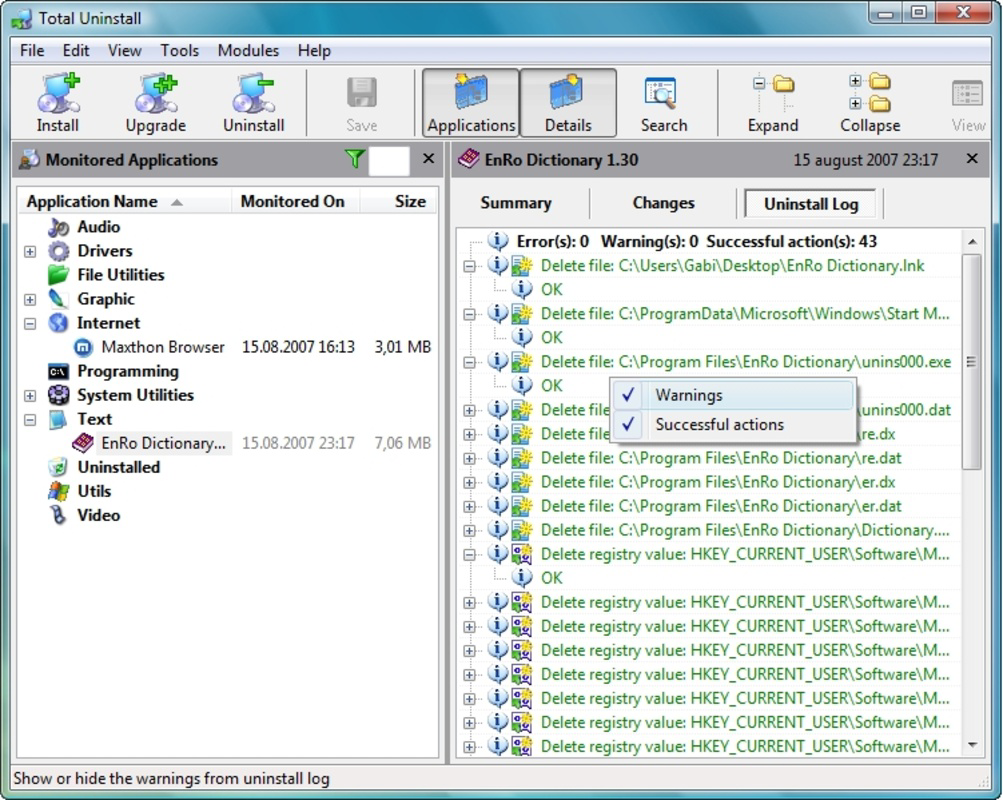
- Installation Monitoring – During the installation of new software, the tool tracks all system changes, including file modifications, registry updates, and service configurations, providing a detailed log of what was added.
- Performance Optimization – By minimizing digital clutter and ensuring clean removals, the app helps maintain faster boot times, smoother operation, and improved responsiveness over time.
- Free and Feature-Rich – The application is fully functional without any cost, offering all core features without trial limitations or in-app purchases.
For example, a user installing a graphics suite may leave behind multiple configuration files and temporary caches. Total Uninstall can detect and remove these even after the program’s standard uninstaller has been run. Similarly, when preparing a system for transfer, the app ensures that no residual data remains, enhancing privacy and system integrity. These capabilities make it a valuable tool for both routine maintenance and critical cleanup tasks.
Interface, UX & Performance
Although the developer did not provide detailed information on the user interface, the app is designed with a functional layout focused on clarity and efficiency. The navigation appears to follow a linear workflow: initiate monitoring, install software, then review and remove all related components. This streamlined approach reduces user cognitive load and supports consistent results.
Visual style is minimalistic, prioritizing utility over aesthetics, which aligns with its role as a system maintenance tool. Users can expect a straightforward experience with clear status indicators and actionable results. The interface likely includes a dashboard that displays installed programs, monitored changes, and removal options.
Although the developer did not list formal performance metrics, the app’s file size of 12.5 MB suggests a lightweight footprint. This indicates efficient resource usage and minimal impact on system performance during operation. Responsiveness is expected to be consistent across various Windows device categories, including desktops and laptops, though specific benchmarks were not disclosed. Stability is likely maintained through regular updates, as evidenced by the latest version release in November 2023.
Platform Compatibility & Technical Requirements
Total Uninstall is designed exclusively for the Windows platform. The app is compatible with Windows operating systems, though specific minimum OS requirements were not listed. The latest version, 6.2.0.0, has a file size of 12.5 MB, indicating a compact and efficient installation package.
Given its nature as a system-level utility, the application likely requires elevated permissions to access system files and registry entries. However, the developer did not specify these details. Users should ensure they are running a supported version of Windows and have administrative rights to fully utilize the app’s features. Compatibility information was not fully disclosed, so users are advised to verify functionality on their specific system setup.
Pros and Cons
Pros
- Comprehensive removal of programs and associated files
- Effective junk file and registry cleanup
- Installation process monitoring for better transparency
- Lightweight at 12.5 MB with no performance overhead
- Completely free with no hidden costs or limitations
Cons
- Platform limited to Windows; no support for macOS or Linux
- Developer did not provide detailed system requirements
- No mobile version available for on-the-go system maintenance
- Interface details not publicly disclosed
- Update frequency and release notes not specified
FAQ
Is Total Uninstall safe to use on my computer?
Yes, the app is designed to operate within standard Windows system permissions and focuses on removing software and files that are no longer needed. It does not modify core system components without user confirmation.
Can I use Total Uninstall on Windows 10 or Windows 11?
While the developer did not specify compatibility details, the app is built for the Windows platform and is likely compatible with recent versions of Windows 10 and Windows 11.
Does Total Uninstall require an internet connection?
Basic functionality does not require an internet connection. However, updates may need online access if the app includes automatic update features.
Is there a mobile version of Total Uninstall?
There is no mobile version available. The app is currently designed exclusively for desktop and laptop systems running Windows.
How often should I run Total Uninstall?
Users may run the tool after major software installations or when noticing system slowdowns. Regular use is recommended for optimal system hygiene.
Final Thoughts
Total Uninstall stands out as a focused, efficient utility for users committed to maintaining a clean and optimized Windows environment. Its ability to detect and remove residual files, monitor installation changes, and improve system performance makes it a reliable choice for both casual users and technical professionals. The fact that it’s completely free enhances its value proposition, offering robust features without financial cost.
While it lacks mobile availability and detailed system specifications, its core functionality remains strong and purpose-built. For anyone managing multiple software installations or preparing a system for reuse, Total Uninstall delivers tangible benefits. If you're looking for a secure, lightweight, and effective tool to remove programs and clean your hard drive, this app is worth considering.
Download Total Uninstall now
Guides & Tutorials
How to install Total Uninstall
- Click the Download button above.
- Once redirected, accept the terms and click Install.
- Wait for the Total Uninstall download to finish on your device.
How to use Total Uninstall
This software is primarily used for its core features described above. Open the app after installation to explore its capabilities.
User Reviews
No reviews yet. Be the first to share your experience.
You may also like
more
Que no te pillen¡
About !Que no te pillen¡Reviewed by Jason A. BilbreyShow MoreShow Less

3D Combat Zone
About 3D Combat ZoneOriginally released in 1983, 3D Combat Zone immerses players...

666: El día del portal
About 666: El día del portalOn June 6, 2006, Agent P. Stone uncovers a sinister...

80 in 1 Best Flash games
About 80 in 1 Best Flash games 80 in 1 Best Flash games is a collection of 80 fl...

ABYSS SEEKERーーWhat Do You See Deep in The Abyss
About ABYSS SEEKERーーWhat Do You See Deep in The AbyssIn ABYSS SEEKER, players...

ACA NEOGEO THE KING OF FIGHTERS 2002 for Windows
About ACA NEOGEO THE KING OF FIGHTERS 2002 for WindowsTHE KING OF FIGHTERS 2002,...